Showing posts with label Digital Scrapbooking. Show all posts

Thursday, December 23, 2021

Wild Whisper New Wild Holiday Home Digital Collection Layouts!

Hello friends! I'm over on the Wild Whisper Blog today with a look at the brand new Wild Holiday Home Paper, Cards and Cut Apart Digital Collection! You can do so many awesome things with this collection, which is ready to download now! 

I used both the Project Life and the Go Daddy Studio Apps to add elements from the Wild Holiday Home collections and create these digital layouts on my iPad. 

There are so many possibilities with this collection - print the elements out and use them on your pages or create digital layouts to share with family and friends online!

Thanks so much for stopping by! Be sure to check out all the details on the Wild Whisper Blog and use the code DTKARLA at the Wild Whisper Shop to save 10%! I hope you all have a very Merry Christmas and a Happy New Year!!

Supplies:
 

Tuesday, November 7, 2017

Wild Whisper Designs - Home For The Holidays Unboxing Video!

Hi friends! I’ve got a quick video for you today giving you a look at the awesome new Home For The Holidays collection from Wild Whisper! I am going to love using this in my holiday craft projects ❤️✂️💚✂️❤️


Thanks so much for stopping by today! If you want to check out this beautiful collection you can find it HERE! Wishing you a happy, crafty week!


Saturday, June 10, 2017

Inspiration Saturday!

Hello friends! I'm back today to share some inspiration websites, blogs, downloads and even a recipe with you!

1) If you are looking to sharpen your colouring skills, a great place to check out is Kit And Clowder - an online colouring and craft class website. As well as offering classes, they have freebie digi files, giveaways in their Facebook group and lots of helpful info on their FAQ page, including Marker Blending Sheet Downloads (at the bottom) showing you what markers to combine to get the colours you're looking for.

2) Dreaming Tree SVG is a fantastic site full of wonderful SVG files - many that are 3D! There are lots of FREEBIES for you to try out with your own electronic cutter, and they often have a free gift with purchase offer. Their service is really great, and there are videos to show you exactly how to put the files together after you cut them!

3) There are also some really cool free cutting files on the My Crafty Life blog that I recently came across. It doesn't look like Dan is blogging much anymore, but fortunately, he still has these awesome downloads available!

4) The Free Pretty Things For You website has some amazing downloadable images, papers and clipart! You are really going to want to take a look through Keren's beautiful site and print off some goodies for your stash!

5) And, lastly I thought I'd share a recipe for Oatmeal BlueberryMuffins I recently made! I wanted to have lemon blueberry - so I substituted the milk for 1/2 cup of lemon juice mixed with 1/2 cup of water. They were really good!!

Thanks so much for stopping by today! I hope you have a wonderful weekend!!


Monday, February 27, 2017

Happy Birthday Masculine Card using Wild Whisper Products!

Hello! Hope you've all had a wonderful weekend! We celebrated my husband's birthday on Friday and I made this birthday card for him using some wonderful supplies from Wild Whisper! I layered the beautiful papers from the Focus On You 12x12 Paper Pack in the background, using more of the masculine colours in the collection, and stamped the camera and feathers from the Focus On You Wild Whisper Stamp Set using a gradient ink pad. I love that you can use all the elements from these paper packs - and the strip of cameras at the bottom of one of the patterned papers was perfect to add as a border along the top of my card! I added a sentiment from one of the Tim Holtz chit chat sticker packs and used my Dylusions Paint Pens to add some hand drawn stitching lines.


I fussy cut around the feathers and then popped one up with foam dots when I got them layered they way I wanted. I added a bit of Stickles for bling - cause every birthday needs bling! Then, I topped it with some gorgeous sequins and a cork star from SpiegelMom Scraps as well as some of the Focus On You sequins, which were designed exclusively for Wild Whisper by SpiegelMom Scraps! They coordinate beautifully with the collection!


Here's a look at the inside, where I added another of the Tim Holtz stickers and a Happy Birthday stamp from the Wish Big Pretty Cute Stamps set. I wanted to coordinate the envelope, so I used the camera from the Wild Whisper stamp set again with some of the stamps that look like a flash! P.S. I used my 3 new ink colours from the Tim Holtz Oxide Distress Inks for the flashes and I LOVE how these inks stamps! I'll definitely be sharing more on these as I build my collection ;)

Here's a Project Life page I made with the PL App! If you want to try the recipe for the Pumpkin Spice Bread that I used to make Mike's gluten free cake you can find it HERE.
Thanks so much for stopping by. I hope your weekend was fantastic and you got some time for yourself!

You can follow me on social media at these links here:

Linked to:
Mojo Monday - sketch 485
Crafty Hazelnuts Patterned Paper - February Challenge
DL Art - February Linky Challenge
FFC #177- AG
Little Scrap Pieces - Show It Off Saturday


Sunday, August 21, 2016

Using Digital Stamps on a Digital Project Life Page!

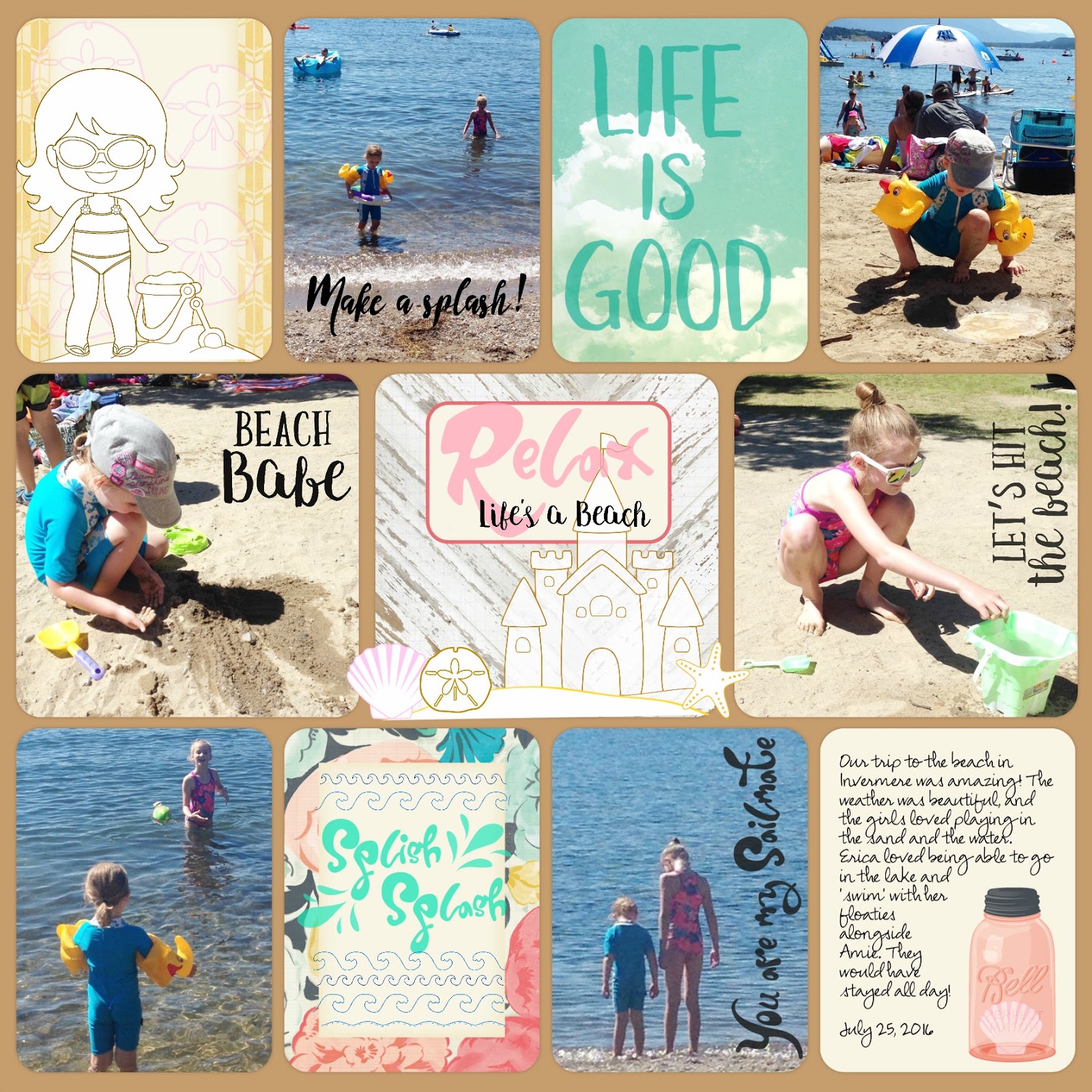
I love using my Project Life app on my iPad, and it was so easy to incorporate the cute digital stamp files from Pretty Cute Stamps onto my page, that I just had to share!

I first opened my saved digital page in the PicMonkey program and then choose to embellish with the PNG versions of the digital stamps I wanted to use by choosing to add an overlay by clicking on the butterfly icon. This allowed me to layer on the PCS Digital Stamps to create a scene. I adjusted the opacity of some of the stamps so they were lighter, like the sand dollars on the card background on the top left and the seashell which looks like it's inside the jar on the bottom right!


I love the way I can change the colour of the stamps and even turn them to fit just the way I want on my page. The Splish Splash card reminds me of hand stitching. You could easily embellish single cards this way and print them with your photos to put in a physical album as well!

Here's a look at the page when I first created it in the PL app, with the journaling cards I chose. I typed my journaling on one of the cards and left the others blank so I could embellish with PCS digital stamps.

Here's a look at the stamp sets I used. The sentiments are so awesome! 
Life's A Beach

Wave Borders

Beach Babes

Beach Bums

Thanks so much for joining me today! Don't forget to check out our current challenge - Let's Celebrate, at the Pretty Cute Stamps blog, and be sure to head over to the PCS Store to see all the awesome stamp goodies!


Tuesday, July 26, 2016

Relax, You're At The Lake!

Hi friends! We've been having a wonderful time relaxing at the lake in Invermere the last couple days! I thought I'd share a Project Life page I put together using the Project Life app, my iPad and the Rhonna Designs app on the trip home. I love being able to access my photos I took on my phone and then make a scrapbook page with them!


I hope you have a relaxing week, whether you're at the lake, or having a bit of crafty fun wherever you can fit it in!

Linked to:
The Casual Craftlete - Creative Gallery #190


Friday, December 4, 2015

December Daily Layouts - Day 1-4!

After listening to a podcast with the Scrapgals a couple weeks ago on December Daily I decided I really wanted to document our December this way, but I knew I'd never have time to do a paper book. I decided to use the Project Life App and get my journaling and pics down. Then, at a later time I can either print out my layouts or use them to refer to when I print my photos and put the journaling in my Project Life scrapbook.

Here are days one through four!


I'm sharing these over on Instagram, where you can follow along as I post daily! I hope you're enjoying your December. It seems to fly by so quickly, sometimes I need a reminder to sit back and just relax a bit!


Monday, June 8, 2015

Bimini Moose Challenge - Anything Goes with optional twist Specific Family Member!

Happy Tuesday! I'm back today to bring you another Pocket Scrapbooking challenge over at BIMINI MOOSE!
Our challenge this time is...
Pocket Scrapbooking - ANYTHING GOES
with an optional twist - Specific Family Member


Do you have a favorite Aunt or Uncle? What is it about them that makes them so special to you? Include a photo and tell us all about it for this Optional TWIST - SPECIFIC FAMILY MEMBER. Or maybe you have a family member that went on an exciting trip (without you - what nerve LOL), and you'd like to show pictures of your son or daughter or other family member overseas or off to summer camp for the first time or leaving for college or getting married or having a baby or or or.... I'm sure you can think of lots of reasons to scrap a specific family member. We can't wait to see!

Our challenges run for 2 weeks. This one will close on Mon, June 22 @ Noon Eastern time - giving us time to pick a winner for the post the following day with our Next Challenge.

We will choose one winner per challenge to win a cut file from our amazing sponsor - 
These files are perfect to include in your Pocket Scrapbooking Layouts and in your other crafting as well.

For my project for this challenge I have chosen to create a digital layout in the Project Life app about my lovely grandmother! I found some pics in a box (have to do something with these!!) and simply took a picture of them with my iPhone. I was then able to open them in the app and make this sweet layout! After choosing my PL cards and adding journaling I saved it and reopened it in Rhonna Designs to add some digi washi tape, more journaling and digi stickers!


I just love how this turned out! I love being able to have it on my phone as a reminder of how great a woman she was and I can always print it in either an 8x8 or 12x12 format and include it in my album!

Be sure to pop over to Bimini Moose and check out the rest of the DESIGN TEAM and what they have created to inspire you to play along. There will be several posts on the Bimini Moose blog during our challenge, so if you want to see the current challenge, click on the CHALLENGES tab on the blog. If you want to browse through all of the posts with ideas, tutorials, and some personal layouts, click on the HOME tab on that blog

Thanks so much for joining me!! I love seeing and hearing what you are up to!


Thursday, June 4, 2015

Go Lime Team!

I cannot believe it's June! Where has the time gone? I really wanted to scrap these recent soccer pics of Erica's first year playing soccer. The little kids are so cute and they are so fun to watch!

For this layout I decided to do a digital layout with the Project Life iPhone app. I love that I can easily add or move pics in whatever layout format I want! After I picked what photos I wanted for my layout I added the PL cards from the soccer edition. I also love that for only a little over a dollar I could choose this theme. I don't have many soccer themed embellishments in my paper stash, so now that I have these cards I can print them out at home or with my photos to use in my pocket pages!


After I finished adding all my pics, cards and journaling to my page I exported it as a 12x12 page and saved it to my camera roll.  Then, I was able to open it up in Rhonna Designs (love this app!) and add some text and digital graphics to my page!

Thanks so much for joining me today and sharing my scrapbook addiction ;)


Tuesday, December 30, 2014

Project Life App!

I hope you all have had a lovely Christmas! I have really enjoyed the past week and I'm really getting into my daughter being home for Christmas break - but it seems that bedtimes are creeping later and the girls are sleeping in - so I guess over the next few days we'll have to adjust that!

Have you been keeping up with all the amazing pocket page projects Janis from Bimini Moose has been sharing?! She's been working on her 2014 year in review layouts and they are so inspiring!!

I've been having so much fun playing around with the Project Life App on my iPad! I thought I'd share a few layouts I've created over the past few days featuring some holiday moments.


I'm going to try printing these out & I'll let you know how that turns out! I think I'll use an 8x8 format and put them in an album. I'm still trying to work out how I will structure my 2015 paper Project Life album, but like anything else, I guess it will be a work in progress and I'll just dive in!

Hope everyone has a happy and safe New Years! Be sure to check back as I will be posting more pocket page scrapbook pages and next week we will be posting our first ever Bimini Moose Pocket Page Challenge!!

Linked to:
DL Art - Thankful Thursday December Linky Challenge
Little Scrap Pieces - Show It Off Saturday Dec 27
613 Avenue Create - AG
Simon Says Stamp Wednesday Challenge - AG